In the video streaming world, one big challenge is getting valid and reliable data about how your viewers perceive your streams, in terms of viewer experience-related metrics like startup time and resolution achieved. Common Media Client Data (CMCD) lets a video player tell the CDN, or any other collector, what the player is doing. CMCD v1 has been a huge success, and surprisingly so, if I may add, since the ecosystem was quite fragmented before that. There are still many player-side SDKs available (even we have one!), but CMCD helped bring a shared view to the table.
CMCD v1 was not without its flaws. So CMCD Version 2 added a lot to the original. It was released in 2026 and is now seeing adoption across the industry. In particular, we now get an “event mode” which acts more like typical analytics collectors, sending data about every key event (playing, stalling, …), in contrast to the previous spec which only allowed for sending selected data as part of actual video segment requests.
But still, we wanted to know how far it gets you in practice: can you actually rebuild what happened to a viewer from the data alone, and is that enough to estimate the quality they saw? Read on to find out more.
Why?
What prompted this post was Dan Rayburn’s LinkedIn post. He asked whether companies would be willing to build a CMCD analytics stack themselves, or rather buy a solution — while noting that commercial solutions offering a CMCD v2 collector are still hard to find. The responses are mixed: commercial offers exist, but others say they’d rather write it in-house at that stage. The Bitmovin 9th Video Developer Report (2025/2026) edition confirms that, for analytics, 26% still rely on in-house tools.
So, how far can you get with using CMCD v2 data? To find out, we recorded a short session with hls.js 1.7.0, which is the first major release to support CMCD v2 event mode, and went through the reports one by one.
And, if you know the vision of our company, you will understand that viewer-side analytics are only part of the picture. The bigger question is what this data tells you, and whether it allows you to a) discover all sorts of issues and b) optimize your delivery?
CMCD v1 and v2 in short
With CMCD v1, the player attaches a few keys to each segment request: the bitrate, the buffer length, possible buffer starvation, the measured throughput, a session ID, and so on. The CDN sees these in its logs.
That is useful, but limited. A stall, for instance, shows up as a bs (buffer starvation) flag on the next request. It tells you that the buffer ran empty at some point since the previous request. It does not tell you when, or for how long.
CMCD v2 adds more keys, and two ways of reporting:
- In response mode, the player sends a report after each segment download, with timings such as time to first byte (
ttfb) and time to last byte (ttlb). These are indeed useful for checking CDN-side caching and connectivity! - In event mode, the player sends a report when something happens: playback starts, pauses or stops, the bitrate changes, or an error occurs. It can also report at a fixed interval, making it work like typical client-side analytics collectors.
Here is how the two modes compare when the player stalls for 1.5 seconds:
Request mode (CMCD v1 and v2)
Keys ride along with each segment request
Event mode (CMCD v2)
The player reports events to a collector
For event mode, the main benefit is that these reports can go to any collector you choose, not only to the CDN. In fact, I’ve heard through the grapevine that this mode was added precisely because it could allow you, as a streaming provider, to bypass the CDNs — although they would certainly benefit from having such data for performance optimization reasons. Anyway, I digress.
Rebuilding a session from event reports
What is really needed to know what the viewer actually saw? We focus on player states, but as we will see later, additional data is required to get the full picture.
Our hls.js test session lasted 82 seconds. We paused once in between and once at the end. hls.js then sent 32 CMCD reports. Here are two play-state reports, 2.04 seconds apart:
{ "e": "ps", "sta": "s", "ts": 1792482342416, "br": [2149], "mtp": [2100], "sn": 3, ... }
{ "e": "ps", "sta": "p", "ts": 1792482344458, "br": [6222], "bl": [0], "mtp": [77700], "sn": 6, ... }
e: "ps" means that the play state changed, and sta is the new state: s for starting, p for playing. ts is the time of the change. The difference between the two timestamps is the startup delay, or initial loading delay, as we call it: 2.04 seconds.
A stall shows up in the same way. The player reports sta: "r" (rebuffering) and later sta: "p" again. There was no stall in our recording, but if the player sends these events, you can piece the timeline together without much effort.
After each segment download, hls.js sent a “response received” report:
{ "e": "rr", "url": "https://test-streams.mux.dev/x36xhzz/url_8/url_591/193039199_mp4_h264_aac_fhd_7.ts",
  "rc": 200, "ttfb": 1424, "ttlb": 2548, "br": [6222], "bl": [0], "mtp": [77700], "sn": 7, ... }
This gives you the bitrate, the HTTP status, and how long the download took.
Important to note that hls.js did not send the segment duration, the object type (audio or video), the playhead time, a media start delay or dropped frames. Most keys in CMCD are optional, so each player sends what its developers chose to implement.
Put together, the session looks like this. Hover over or tap a report or a bar to see the details:
CMCD v2 event reports
Timeline rebuilt from the reports
Reported bitrate
What this gives you for a quality estimate
Again, from a viewer’s perspective, what does that mean? ITU-T P.1203 is the standard model we use to estimate the quality of an adaptive streaming session. In Mode 0, it only needs metadata:
- per segment: bitrate, resolution, frame rate, codec and duration
- stalls: when they happened in the media, and how long they lasted
- the device type and display size
From CMCD itself, you can already get some of that:
- Bitrate: directly from CMCD (although it is only the joined media bitrate, not the individual audio/video bitrates).
- Startup delay and stalls: from the play-state events.
But key pieces are still missing:
- Segment duration: not in the reports. You need to fetch the playlist or manifest to get that.
- Resolution and codec: not in CMCD. The reported 6,222 kbit/s matches the 1080p H.264 rendition in the master playlist, so you can look it up there.
- Frame rate: not in CMCD, and not in this playlist either. Needs parsing of the media segments themselves.
- Device type and display size: not available; you need a dedicated library.
So with event mode and the playlist, you can build a usable mode 0 input for most sessions. That is real progress over v1, where stall durations had to be guessed. But as you can see, not everything is in the reports.
The catch: it all happens on the server
Getting from raw CMCD reports to a quality score takes a fair amount of server-side work:
- You need to store every report per session, in order, and handle reports that arrive late or in batches.
- Fetch and keep the playlists or manifests that each session used. Now the CMCD collector needs to talk to the origin server. For live streams, they change all the time.
- Match each reported bitrate to a rendition. This breaks when two renditions have the same bitrate, for example with different codecs. And it requires a dedicated worker job to fetch the rendition metadata from the playlist.
- Handle players that send different keys and modes, and that change their CMCD support from one release to the next.
So while CMCD is valuable data, every team that wants a quality score from CMCD has to build this too. We think that is a good reason to still measure inside the player with an SDK that is part of a complete service offering. An SDK can read the actual resolution, the display and the device, and send complete session data in one format, no matter which player is used.
What passive data cannot answer
CMCD and player-side SDKs share one property — the data comes from whoever happens to be watching. That gives you a broad picture across devices and regions, which is valuable in and of itself. But some questions remain open:
- Did a change we made to the CDN, the peering, the encoding, or the player config cause issues? For a clean answer, you want the same content, from the same place, at the same time, before and after.
- Was it the access network, the CDN or the player? Users on legacy devices and bad Wi-Fi distort your statistics. You’d need network tests next to the video test, or measurements from known locations.
As CMCD v2 rolls out, and streaming providers adopt event mode to send reports directly to their own backend, CDNs lose the visibility they had with v1 request headers. And ISPs in that ecosystem are left out completely: you carry the traffic and handle customer complaints, but you don’t have any of that data. For the popular streaming services in your country, how can you know how well they actually perform on your network, or whether an optimization helped?
Active measurements to the rescue
To solve this, active measurements can play real streams on test devices, on a schedule, like a customer would. You know exactly what was played, on which device and screen, over which connection. You can run them for any service, not only your own. And all the needed data for a holistic quality analysis is there, from all the layers of the stack. That is what our Surfmeter probes do.
Active measurements: Surfmeter probes at known locations, on known networks and devices. They play the same streams on a fixed schedule.
Passive player data: phones and PCs report through CMCD or a player SDK whenever someone watches. Network and location are often unknown.
We’ve put together a comparison of CMCD v1, CMCD v2 event mode and active measurements.
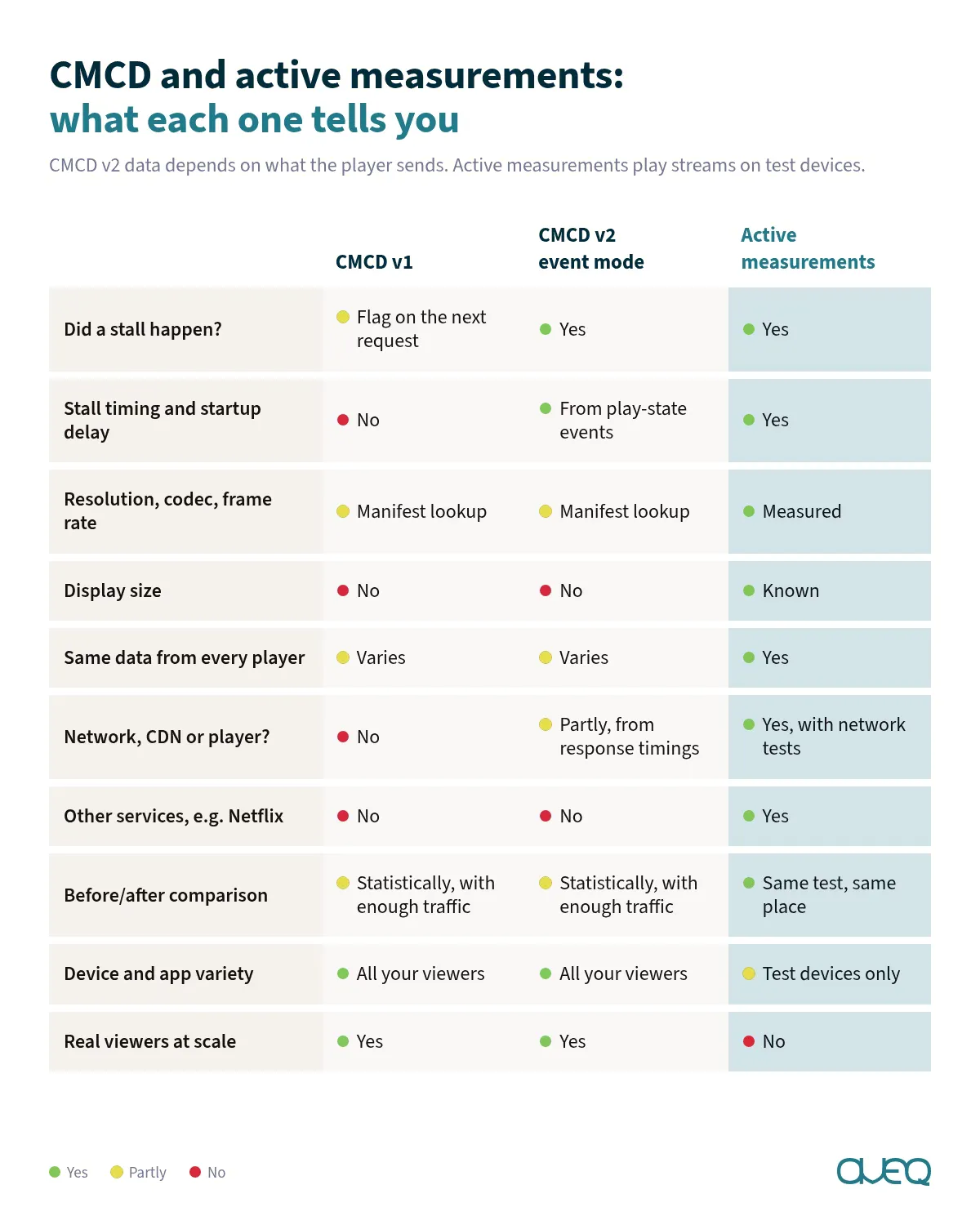
The last row matters: active measurements do not show you millions of real viewers. In contrast to player-side tracking, they answer different questions, so the two approaches work well together and are not mutually exclusive. This is how we worked together with Gcore to analyze and optimize the performance of their CDN.
If you already use CMCD v2 data, we would like to hear what you do with it, or how you plan to integrate it. And if you are an ISP that wants to know how streaming services perform on your network, get in touch.